Introducing JournalKit
JournalKit is a piece of software for a specific need and a specific kind of person: someone who wants to design their own physical daily journal for writing in, but prefers to think in code, modules, and measurements while doing so.
Use JournalKit → Download Harris’s Pages 105×170mm (.zip) ↓

At various times in my life I’ve tried to keep a daily(-ish) journal, but never successfully for long. I wanted to give it another go and I wanted my journal to serve a few purposes:
- Productivity: Organize the day ahead in the morning and evaluate how it went in the evening.
- Mindfulness: Make space to reflect on my thoughts and feelings from the day.
- Life record: Months or years later, look back and see what I was thinking or feeling at a given time, even look for trends in what made me feel good or bad and which habits made my life better or worse.
For a time I used CGP Grey/Cortex’s “Theme Systems Journal” and I’ve taken much inspiration from that¹. That journal is deliberately flexible, with pages of unlabeled boxes. The boxes hint at their purpose, but don’t prescribe it. Over time, I found specific ways I liked to use those boxes.
But, I found myself falling off the wagon. That’s OK. A daily habit can still be useful even if you don’t do it literally every day. And, as Ruthie regularly reminds me, if a particular tool or system improves your life, it does so whether or not you stick with it forever. For those of us who need regular novelty in the systems of our daily life, that novelty can be well worth chasing.
Now that I knew what I wanted from a journaling habit, I could design one to fit me. I hoped this would also make it “stickier.” Things I make myself are often more compelling than alternatives, because they’re bespoke but also because using them gives me the sense of accomplishment and joy that comes from scratching my own itch.
I started laying it out in Illustrator and InDesign, but found the process tedious – making modules line up on a grid, then carefully redoing it when I decided to rearrange. I caught myself compromising on my ideal design to do things technically easier.
So instead I specced out a system for writing out journal page templates in code and handed that spec to an LLM coding agent to flesh out and build. With some iteration (which continues even now), I arrived at something that let me experiment with page designs freely and flexibly. The library itself is “vibe coded” but the ideas feel wholly mine. Then I used it to make my journal.
I printed a week’s worth of pages, iterated on the design based on how using them felt, tried it for a few more weeks, iterated some more and then added some weekly pages, working my way out from the more granular daily journaling to broader swaths of time.
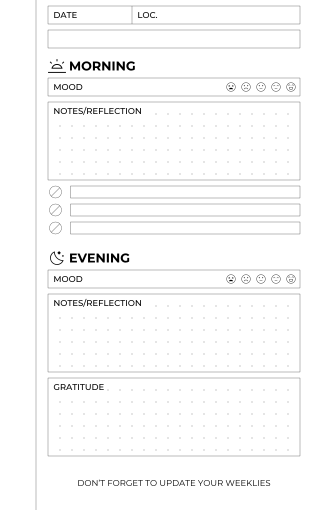
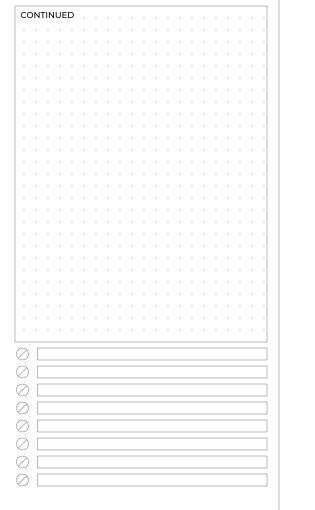
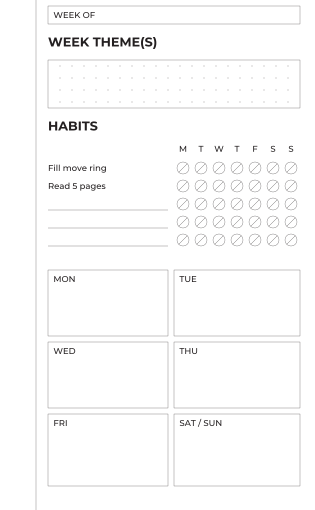
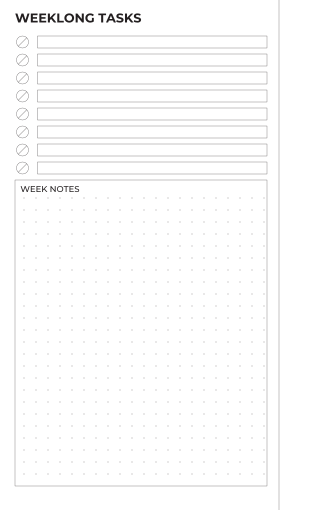
Download Harris’s Pages 105×170mm (.zip) ↓
Notes on the Physical Journal
My journal uses a cheap but attractive faux-leather A6 binder that I found on Amazon. A binder lets me add pages as I redesign and print them and eventually retire old pages to an archive.
Most paper advertised as A6 binder paper on Amazon is actually larger than true A6 (105×148mm). That’s nice, because A6 paper is small, but the sizes aren’t especially standardized. I bought pack of 105×170mm, which I like, but only one seller seems to carry it. I noticed a slightly more standard size seems to be “Personal” 95×172mm. I tried switching to that, but discovered the extra centimeter of width is significant! My trusty old Brother laser printer can’t handle paper any narrower than 105mm! So I switched back to the quirky size and bought a bunch to last me a while. If I run out and it’s discontinued, I’ll cross that bridge then.
The printer also refuses to duplex print paper this small, so I end up printing a batch of recto pages and then run the same sheets through again to print the verso side.
I can imagine things about the physical journal that could be nicer – I’d like a built-in pocket sized for an AirTag so I worry less about losing it, I’d like pockets sized especially for the tools I want to keep inside it (small metal straightedge, sheets of decorative and functional stickers), I’d prefer a magnetic clasp to a snap – so I’m tempted to learn some basic leatherworking to make my own journal cover… but that’s a project for another day.


Using JournalKit
JournalKit takes a YAML definition of a page template and generates SVGs, PNGs, and PDFs from that definition. It’s inspired by the structure of static site generators, like the one that powers this site.
A quick start with JournalKit looks like:
# First-time: install and start a new project
pipx install journalkit
journalkit init my-journal && cd my-journal

# Watch the project for updates and continuously generate output files including PDFs
journalkit watch --pdf
# OR build the project just once
journalkit build --pdf
Here’s the YAML input for my actual daily journal page:
document: daily

page:
  size: [105, 170]
  # Every margin is an even number: the module grid is 2mm and is anchored to
  # the page, so an odd margin would put the whole text block off-grid.
  margins:
    top: 2
    bottom: 8
    inner: 16      # binding side — enough to clear the stitching
    outer: 5       # odd, so that the text block width (95 - 16 - 5) is even

grid:
  module: 2        # every module snaps to this
  dots:
    spacing: 4
    origin: [0, 2]     # page-anchored, so dots line up across modules
    radius: 0.125

defaults:
  gap: 2           # default vertical gap between modules

theme:
  ink: "#000"            # one color for strokes, text and dots
  stroke_width: 0.25pt
  font:
    family: Montserrat
  label:
    size: 8pt
    weight: 500
    dy: 4          # baseline below the module's top edge. The 3.55 default
                   # optically centers an 8pt cap in a 5mm row; rows are 6mm
                   # on this grid, so (6 + 1.976) / 2 ≈ 4 centers it again.
  heading:
    size: 12pt
    weight: 700
  dots:
    reserve_label: text

# Drawn on every page; `inner` mirrors automatically between recto and verso.
decorations:
  - type: rule
    edge: inner
    offset: 4        # even, so the rule sits on the 2mm grid like everything else

templates:

  daily-front:
    side: right
    content:
      - type: fields
        height: 6
        columns:
          - {label: DATE, width: 28}
          - {label: "LOC."}            # takes the rest

      # Blank line for the day's theme or title — "First day in Spain!".
      # Unlabelled on purpose: it is one writing line, matching the row above.
      - type: box
        height: 6

      - type: heading
        text: MORNING
        icon: sunrise
        gap: 2

      - type: rating
        label: MOOD
        icon: mood
        count: 5
        gap: 0

      - type: box
        label: NOTES/REFLECTION
        height: fill
        dots: true

      - type: checklist
        rows: 3
        row_height: 4
        row_gap: 2

      - type: heading
        text: EVENING
        icon: moon
        gap: 4

      - type: rating
        label: MOOD
        icon: mood
        count: 5
        gap: 0

      - type: box
        label: NOTES/REFLECTION
        height: fill          # absorbs whatever is left
        dots: true

      - type: box
        label: GRATITUDE
        height: 26
        dots: true

      # Footer nudge to keep the weekly spread in sync with the dailies.
      - type: text
        text: "DON’T FORGET TO UPDATE YOUR WEEKLIES"
        align: center
        size: 8pt
        gap: 8
        weight: 400

  daily-back:
    side: left
    content:
      - type: box
        label: CONTINUED
        height: fill
        dots: true

      - type: checklist
        rows: 8
        row_height: 4
        row_gap: 2


pages:
  - template: daily-front
  - template: daily-back
This produces the daily pages shown above.
JournalKit comes with a suite of customizable, rearrangeable modules, but it also supports defining your own modules in Python.
This is a niche piece of software, but I’ve found it handy and a joy to use. Maybe someone else out there will find something useful about it as well.
Including swiping their half-complete/full-complete checkbox design wholesale. ↩︎